
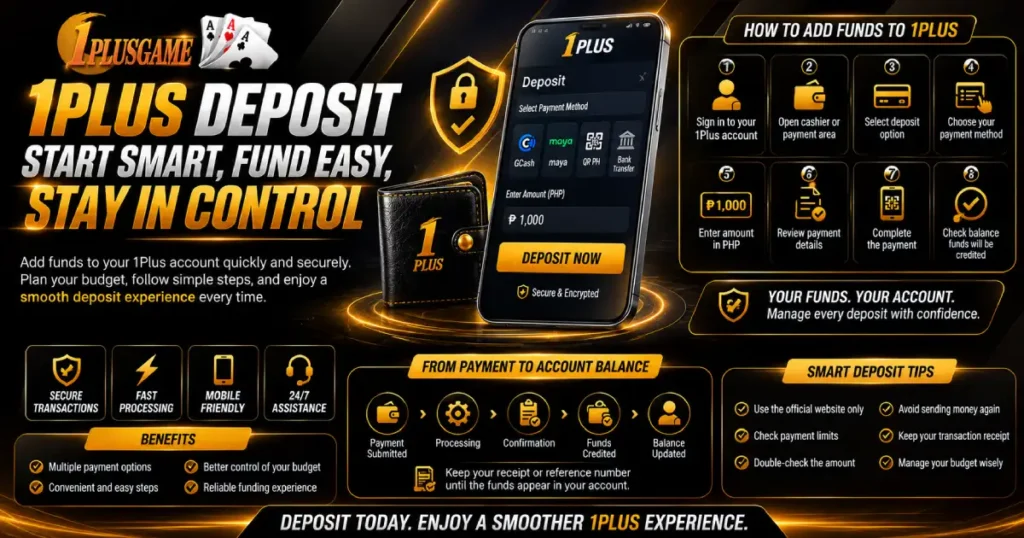

A 1Plus Deposit allows players to add Philippine pesos (PHP) to their account through payment options currently available on the platform. Although funding can take only a few steps, a successful transaction involves more than entering an amount. Players should choose a suitable budget, check the available payment route, follow the current instructions, and confirm that the funds reach the account.
For players asking how to deposit in 1plus ph, the process is straightforward. Sign in, open the payment area, select an available method, enter an amount in PHP, and follow the instructions shown. After completing the payment, return to the account and check whether the balance has updated.
Payment methods and transaction limits can change, so the live cashier should remain the main reference before confirming a 1Plus Deposit.
Prepare Your Funds Before Depositing
A smoother transaction begins with deciding how much money to add. Instead of choosing an amount based on everything available in an e-wallet or bank account, players can establish an entertainment budget first.
Money intended for food, transportation, bills, savings, and other necessities should remain separate. A 1Plus Deposit should come from funds already allocated to entertainment.
| Funding point | What it means |
| Available funds | Money currently accessible |
| Entertainment budget | Amount reserved for leisure |
| Deposit amount | Portion selected for account funding |
Planning the amount makes the payment easier to track. Players already know what they intended to send and can later compare it with the amount deducted and credited.
How to Add Funds to 1Plus
The funding process can normally be completed directly through the account. Menu names may change with platform updates, but the general process remains simple.
- Sign in to your 1Plus account.
- Open the cashier or payment area.
- Select the deposit option.
- Review the available payment channels.
- Choose your preferred method.
- Enter the amount in PHP.
- Review the payment information.
- Complete the transaction and check your balance.
When learning how to deposit in 1Plus, always follow the information generated for the current transaction.
This is particularly important when a 1Plus Deposit uses a QR code or temporary payment reference. These details may apply to only one transaction, so an old screenshot or reference should not be reused.
Choose the Right Payment Route
Philippine users may encounter locally supported e-wallet, QR-based, banking, or other electronic payment options depending on current cashier availability.
A familiar method may be convenient, but players should still check whether it is currently active. Payment providers can undergo maintenance, change transaction limits, or temporarily become unavailable.
Before making a 1Plus Deposit, check whether the payment option:
- Is currently available
- Supports your intended amount
- Works on your device
- Provides clear instructions
- Generates a payment confirmation
The cashier provides the most relevant information for each 1Plus Deposit. If a preferred method is unavailable, use another supported option displayed in the account rather than relying on old payment information.
From Payment to Account Balance
Money leaving an e-wallet or bank account and money appearing in the account balance are separate stages of the same transaction.
After payment is approved, the provider processes the request. Confirmation then reaches the account system before the corresponding amount can be credited.
Payment submitted → Processing → Confirmation → Funds credited → Balance updated
This explains why a successful payment notification can sometimes appear before the account balance changes.
After completing a 1Plus Deposit, check both sides of the transaction. Confirm that the provider shows a successful payment, then return to the account and verify that the expected amount appears.
Keep the receipt or transaction reference until the balance matches the payment.
Check Before Sending Money Again
A delayed balance does not automatically mean the transaction failed.
For example, if a player sends ₱1,000 and receives payment confirmation while the account balance remains unchanged, immediately sending another ₱1,000 could result in an accidental duplicate.
Before making another 1Plus Deposit, check whether the original amount was deducted, whether the transaction is successful or pending, and whether a reference number was generated.
If the transaction is still processing, allow it to finish. If the provider shows a successful payment but the funds remain missing beyond the expected processing period, save the transaction information and contact support instead of automatically paying again.
Review the Amount and Current Limits
Minimum and maximum amounts can affect whether a payment request is accepted. Different payment channels may also operate with different transaction ranges.
Checking these requirements before starting a 1Plus Deposit helps players determine whether their intended amount is supported.
If an amount is rejected, review the limits displayed for the selected payment method before assuming there is an account problem.
Players should also double-check the amount before confirming. A misplaced digit can create a much larger transaction than intended, so reviewing the PHP figure is a simple but important habit.
Understand Cash and Bonus Funds
Deposited money and promotional rewards can have different conditions.
Cash funds come from the player’s own payment. Bonus funds originate from promotions and may include wagering requirements, qualifying amounts, validity periods, or other conditions.
| Balance type | Source | What to check |
| Cash funds | Player payment | Amount credited |
| Bonus funds | Promotion | Terms and requirements |
| Total balance | Applicable combined funds | Restrictions |
When a promotion is connected to a 1Plus Deposit, players should review its terms before accepting it. This makes it easier to understand which funds are available normally and which may have additional requirements.
Knowing this difference before playing can also prevent confusion when managing the account later.
Deposit From a Mobile Device
Smartphones can make funding convenient because many Philippine payment services are accessible through mobile apps.
Before starting a mobile 1Plus Deposit, use a stable internet connection and have the selected payment application ready. The transaction may begin in the cashier, move to an e-wallet or banking app for approval, and then return to 1Plus for confirmation.
Use only the QR code or payment reference generated for the current request. Check the amount before approving it and avoid repeatedly tapping confirmation buttons when a page loads slowly.
After completing the external payment, return to the account and verify the updated balance.
When a Deposit Does Not Appear
A missing balance does not always mean a failed transaction. First determine the current payment status.
If no money was deducted, the payment may not have completed. If the provider lists the transaction as pending, additional processing time may be needed.
If money was deducted and the 1Plus Deposit is marked successful but remains uncredited, keep the important transaction information:
- Deposit amount
- Payment method
- Date and time
- Transaction reference
- Payment status
- Receipt or confirmation
These details can help support identify the transaction. Players should never provide passwords, wallet PINs, OTP codes, or other authentication credentials when reporting a payment issue.
Keep Account Funding Organized
Good funding habits are simple. Decide on an affordable amount before approaching the cashier, check the available payment methods, follow the instructions for the specific transaction, and verify the result afterward.
Use a trusted device, protect account credentials, and keep the payment receipt until the funds have been credited.
A 1Plus Deposit is more than pressing a button to add money. It combines budgeting, payment selection, transaction verification, and account management.
For players learning how to deposit in 1Plus, the best approach is to plan before sending, check while paying, and verify afterward. Following this routine makes every 1Plus Deposit easier to understand and manage, from payment to final account balance.
