
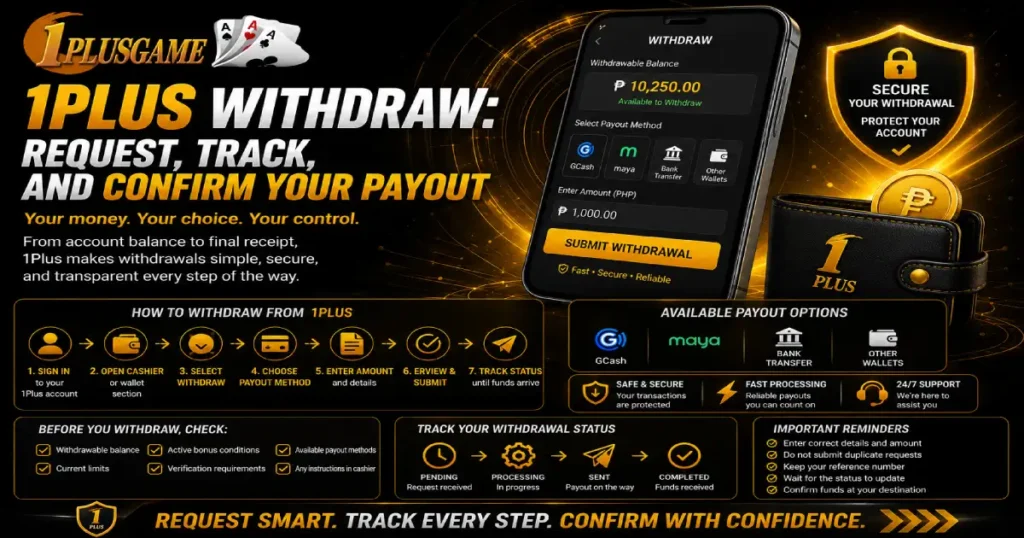

1Plus Withdraw moves eligible funds from your account toward a supported payout method. Unlike depositing, where money is being added, withdrawal involves checking what can be withdrawn, selecting an available method, entering the requested amount, and waiting for the transaction to complete.
Before submitting anything, look at the information currently displayed in your account. Withdrawal methods, limits, account requirements, and processing conditions can change. The live cashier or withdrawal area should therefore be your main reference rather than details saved from an older transaction.
Following the request from account balance to final receipt also makes it easier to tell the difference between a withdrawal that is still processing and one that needs attention.
Check Your Balance Before You Withdraw
Start by looking at the balance shown in your account.
The total amount displayed does not always mean every peso is immediately available for withdrawal. Cash funds, promotional rewards, or funds connected to active bonus conditions may be treated differently depending on current account and promotion rules.
Before starting a 1Plus PH Withdrawal, check:
- Available or withdrawable balance
- Current withdrawal limits
- Active bonus conditions
- Account verification requirements
- Available payout methods
- Any instructions displayed in the cashier
If a promotion is active, review its terms before assuming the full displayed balance can be requested.
How to Withdraw From 1Plus
The exact names of buttons and menus may change, but the withdrawal journey generally begins inside the account’s cashier or payment section.
A typical request follows this route:
- Sign in to your 1Plus account.
- Open the cashier, wallet, or payment area.
- Select Withdraw.
- Review the payout methods currently available.
- Choose your preferred option.
- Enter the requested amount in PHP.
- Provide any information requested for that method.
- Review the details.
- Submit the withdrawal.
- Check its status until the funds arrive.
When making a 1Plus withdrawal, use the instructions generated for that specific request. Do not assume that details from an earlier withdrawal are still current.
Choose an Available Payout Method
The withdrawal section should show which methods can currently receive funds from your account.
The available choices may not always match every method used for depositing. A payment route that accepts incoming funds does not automatically mean it supports withdrawals in the same way.
Before continuing with a 1Plus Withdraw, check the method itself. Look at its current limits, requested account information, and any instructions attached to it.
Most importantly, make sure the receiving details belong to the account or payment destination you intend to use. A mistake here can be more difficult to correct after the withdrawal has already been submitted.
Enter the Withdrawal Amount Carefully
Once you select a payout method, enter how much you want to request.
Check the minimum and maximum currently displayed before confirming the 1Plus Withdraw. If the amount falls outside the supported range, the request may not proceed.
Read the figure again before submission.
For example, if you intend to request ₱1,000, make sure you have not accidentally entered ₱10,000. Small typing errors matter when the transaction involves real funds.
Also compare your requested amount with the balance currently eligible for withdrawal.
Review Your Receiving Details
A withdrawal sends funds away from the platform, so the receiving information deserves a careful check.
Depending on the available method, the page may ask for payment-account information or other details needed to route the payout.
Before submitting a 1Plus withdrawal, compare what you entered with the destination you actually use.
Check for:
- Incorrect numbers
- Missing digits
- Typing errors
- Old saved information
- Wrong payment account
- Details belonging to another person
Do not rush through this stage simply because you have withdrawn before. Review the information attached to the current transaction.
What Happens After You Submit a Withdrawal?
A 1Plus Withdrawal may pass through several stages before the money reaches its destination.
A simple way to view the journey is:
Request Submitted → Account Check → Processing → Payout Sent → Funds Received
This is different from assuming that pressing Withdraw immediately transfers the money.
The request may first need to be recorded and processed. Its status can then change as it moves toward the selected payout destination.
When transaction history is available, use it to see what is happening rather than submitting another request because the money has not arrived immediately.
What Do Withdrawal Statuses Mean?
The wording displayed by the platform may vary, but withdrawal statuses generally indicate where the request is in its journey.
A pending or processing status usually means the transaction has not yet reached its final stage. A completed status indicates that the platform has finished processing the request, although the receiving payment service may still have its own posting process.
If the request is rejected, cancelled, or returned, read any information displayed with the status before submitting it again.
Do not treat every status as the same issue. Knowing where the 1Plus Withdrawal stopped gives you a better idea of what to check next.
Why Might a Withdrawal Require Verification?
Account checks may be required before certain withdrawals can proceed.
Verification and withdrawal are separate processes, but they can connect when the platform needs to confirm information associated with an account or transaction.
If verification is requested during a 1Plus Withdrawal, follow the instructions displayed through the appropriate account channel. Submit only what is specifically requested.
Never provide your password, wallet PIN, banking password, or one-time password to someone claiming those details are necessary to release a withdrawal.
Avoid Repeating a Pending Request
If a withdrawal is already showing in your transaction history, check its status before creating another request for the same amount.
Submitting another 1Plus Withdrawal does not make the first transaction process faster. Instead, you could end up with two separate requests if both are accepted.
Check:
- Whether the original request exists
- Amount requested
- Date and time
- Current status
- Selected payout method
- Transaction or reference number
Keep these details until the transaction is settled.
What If the Funds Have Not Arrived?
First determine whether the withdrawal is still processing or already marked completed.
If it remains pending, review any processing information shown in your account. If it has been completed but the funds are not visible at the receiving destination, check the receiving account and make sure you are looking at the correct payment method.
For an unresolved 1Plus Withdraw, keep a record of:
- Withdrawal amount
- Payout method
- Request date and time
- Transaction reference
- Current withdrawal status
- Relevant transaction confirmation
These details give support something specific to investigate.
Avoid sending sensitive credentials when reporting the issue. Transaction references and account-security credentials serve very different purposes.
Deposits and Withdrawals Serve Different Purposes
A 1Plus Deposit brings money into the account. A 1Plus Withdrawal moves eligible funds in the other direction.
The distinction can be summarized simply:
| 1Plus Deposit | 1Plus Withdraw |
| Adds funds | Requests eligible funds out |
| Uses a funding method | Uses an available payout method |
| Ends with account credit | Ends with receipt at the destination |
| Checks incoming balance | Tracks outgoing transaction |
| May connect to bonuses | May depend on applicable conditions |
Players who need to add money rather than request a payout can refer to the 1Plus Deposit guide for the funding process.
Keeping these two journeys separate makes it easier to understand which payment stage you are dealing with.
Keep Control of Your Withdrawal Details
Before every 1Plus withdrawal, know how much you are requesting, where the money is supposed to go, and what status the transaction currently shows.
Check your eligible balance first. Choose an available payout method, enter the PHP amount carefully, verify the receiving information, and review everything before submitting. Once the request is placed, keep its reference and follow its status rather than creating duplicate requests.
A withdrawal is not complete simply because the request has left your account screen. Follow it through processing and confirm that the expected funds reach the intended destination. That final check closes the transaction and gives you a clear record of what happened from request to receipt.
